Although OTX is Turing-complete, practical experience shows that not every task should actually be implemented in OTX. In particular, for computationally intensive algorithms or functions that lie outside the actual diagnostic processes, the use of a specialized scripting language is often significantly more efficient without compromising process reliability.
Introduction
Within an OTX procedure, an arbitrary script can be invoked. The invocation is performed using ExecuteDeviceService, which can also be used to configure and evaluate the input and output parameters.
The following scripting languages are supported:
- Lua
When compactness and performance are important, especially when using OTX in embedded systems, Lua is the best choice. Since the OTX runtime already uses Lua, no additional system requirements are necessary.
- Python
Due to the large ecosystem of libraries, complex calculations can be implemented efficiently in Python.
Note: The script files and all their dependencies are stored directly within the PTX, so that no additional dependencies are required.
To use a script file in an OTX project, the following steps must be performed:
- Add the script file inside the Mapping Editor
- Bind the script parameters to a DeviceServiceSignature
- Invoke the script, including parameter handling, in the ExecuteDeviceService inside an OTX procedure
- Export a PTX including the script files
- Execute the PTX or start the procedure in OTF
Requirements
- Lua
No installation is required, as it is already included in the OTX Runtime.
- Python
- Install Python, either 32-bit or 64-bit, corresponding to the OTX Runtime version being used.
- Add the Python installation directory to the
PATH environment variable, for example: C:\Users\<user>\AppData\Local\Programs\Python\Python313-32\.
- Set the
PYTHONHOME environment variable to the Python installation directory above, for example: PYTHONHOME=C:\Users\<user>\AppData\Local\Programs\Python\Python313-32
Integration of script files
The script files must be added to the project, see project settings and the script in- and out parameter must be bound to a DeviceServiceSignature inside the OTX mapping editor, see the figure below.
Important: The functions to be used in the script file must be marked using comments, see Lua Scripting Example and Python Scripting Example.
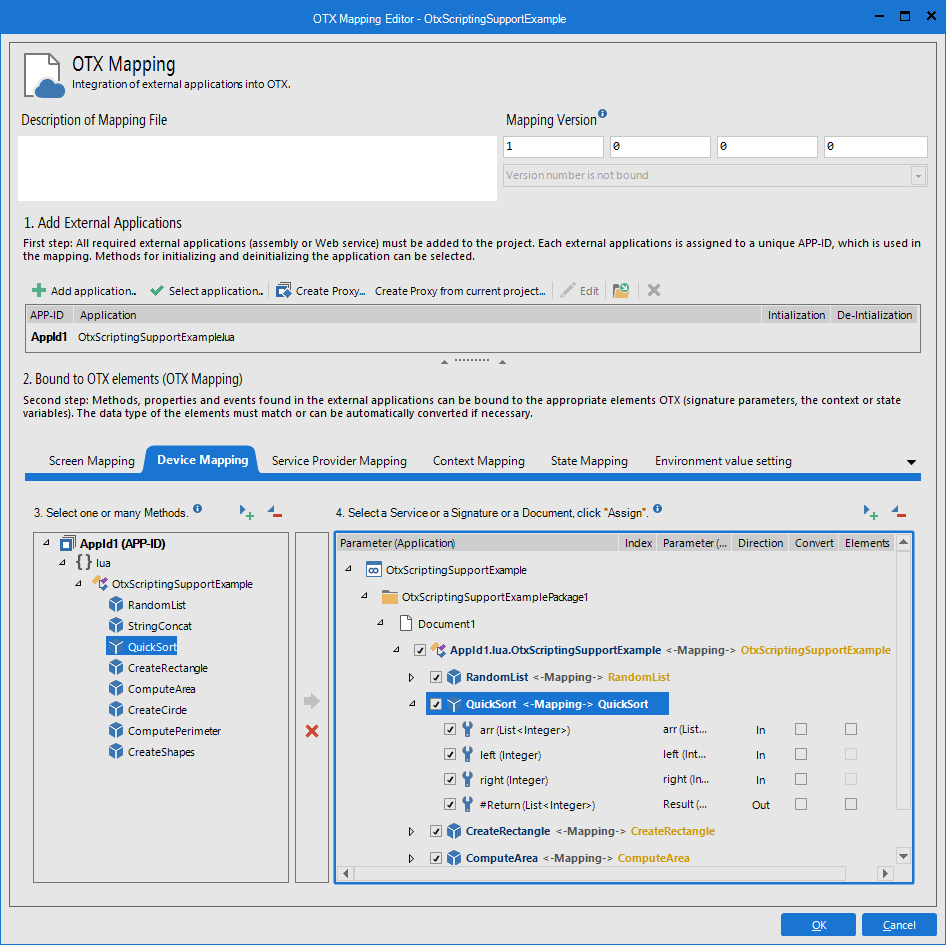
Parameter mapping for Lua
For Lua, only functions marked with comments can be detected and used for mapping. To allow a script method’s parameters to be detected, they must be annotated using special comments as follows:
The following comment describes the parameters of the QuickSort function:
--[[OtxDeviceService: in List<Integer> arr, in Integer left, in Integer right, out List<Integer>]]
function QuickSort(arr, left, right)
if left >= right then
return sortedList
end
...
return sortedList
end
| Comment | Description |
--[[OtxDeviceService | Bound to DeviceServiceSignature |
in List<Integer> arr | Input parameter named arr of type List<Integer> |
in Integer left | Input parameter named left of type Integer |
in Integer right | Input parameter named right of type Integer |
out List<Integer> | Return value of type List<Integer>. The output parameter names are optional. |
The following comment describes the parameters of the TryParseInt function:
--[[OtxDeviceService: in String str, out Integer num, out Boolean]]
function OtxRuntimeUnitTestMapping.TryParseInt(str)
local n = tonumber(str)
if n ~= nil and math.floor(n) == n then
return n, true
else
return 0, false
end
end
| Comment | Description |
--[[OtxDeviceService | Bound to DeviceServiceSignature |
in String str | Input parameter named str of type String |
out Integer num | Output parameter named num of type Integer |
out Boolean | Output parameter of type Integer. The output parameter names are optional; however, their order must match the order of the return values defined in the code. |
Parameter mapping for Python
For Python, functions do not need to be marked. All functions and their parameters can be detected because Python supports strict parameter type. However, functions must declare return type annotations if they exist.
The following example shows QuickSort function:
def QuickSort(self, arr: List[int], left: int, right: int) -> List[int]:
if left >= right:
return arr
...
return arr
def try_parse_int(s: str) -> tuple[int, bool]:
try:
n = float(s)
if n.is_integer():
return int(n), True
else:
return 0, False
except (ValueError, TypeError):
return 0, False
@code{.py}
@subsection OtfOtxMappingScriptingSupport_SupportedDataTypes Supported Data Types
> **Note**: Enumerations are not supported!
A structure is a complex data type that contains other elements. In Lua, a table is used to represent a structure, while in Python, a class is used for the same purpose. It must be marked with a comment to be detected.Structure is a complex datatype and contains other elements inside it. In Lua, Table is used to map with Structure and in Python a Class is used to map with Structure. It needs to be marked with comment to be detected.
@subsubsection OtfOtxMappingScriptingSupport_SupportedDataTypes_Structure_LuaSupport Lua support for Structure
Structures are marked in Lua as follows:
@code{.lua}
--[[OtxStructure: String Form, Map<String, Float> Props, List<Position> Positions]]
local Entity = {
Form = "",
Props = {},
Positions = {}
}
--[[OtxStructure: Integer Y, Integer Y]]
local Position = {
X = 10,
Y = 20
}
| Comment | Description |
--[[OtxStructure | Bound to Structure |
String Form | Structure element named Form of type String |
Map<String, Float> Props | Structure element named Props of type Map<String, Float> |
List<Position> Positions | Structure element named Positions of type List<Position> |
Integer X | Structure element named X of type Integer |
Integer Y | Structure element named Y of type Integer |
Python support for Structure
Python uses strict parameter data types; therefore, data types do not need to be declared in comments. However, property getters must explicitly declare return type annotations.
Structures in Python are declared as follows:
@OtxStructure
class Entity:
def __init__(self, data=None):
self._Form: str = ""
self._Props: Dict[str, float] = {}
self._Positions: List[Position] = []
if data:
self._Form = data.get("Form", "")
self._Props = data.get("Props", {})
self._Position = data.get("Positions", [])
@property
@OtxStructureElement
def Form(self) -> str:
return self._Form
@Form.setter
def Form(self, value: str):
self._Form = value
@property
@OtxStructureElement
def Props(self) -> Dict[str, float]:
return self._Props
@Props.setter
def Props(self, value: Dict[str, float]):
self._Props = value
@property
@OtxStructureElement
def Positions(self) -> List[Position]:
return self._Positions
@Props.setter
def Positions(self, value: List[Position]):
self._Positions = value
@OtxStructure
class Position:
def __init__(self, data=None):
self._X: int = 10
self._Y: int = 20
if data:
self._X = data.get("X", 10)
self._Y = data.get("Y", 20)
@property
@OtxStructureElement
def X(self) -> int:
return self._X
@X.setter
def X(self, value: int):
self._X = value
@property
@OtxStructureElement
def Y(self) -> int:
return self._Y
@Y.setter
def Y(self, value: int):
self._Y = value
The following table lists all existing OTX elements and their counterparts defined decorators.
| Comment | Description |
| @OtxStructure | Bound to Structure |
| @OtxStructureElement | This is a structure element, bound to StructureElement |
OTL code example for Structure
namespace OtxScriptingSupportExamplePackage1
{
package DataType.StructureSignature Entity(String Form, Map<String, Float> Props, List<Position> Positions);
package DataType.StructureSignature Position(Integer X, Integer Y);
}
Export a PTX including script files
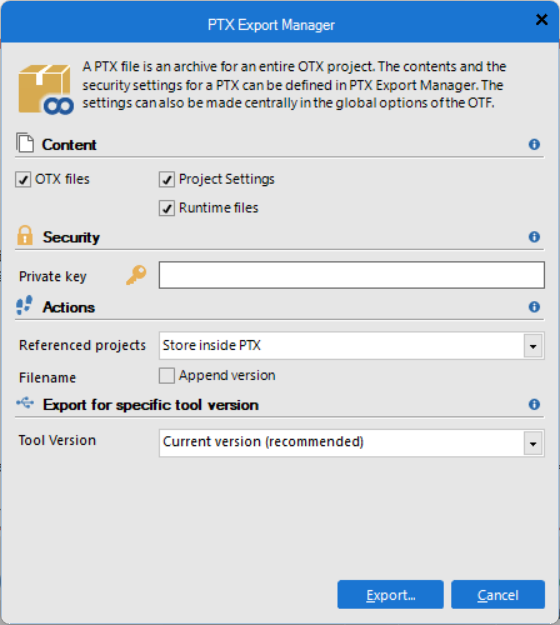
To include the scripts in the PTX, only the checkbox "Runtime files" must be selected in the PTX export dialog. During export, all detected dependencies are copied into the PTX.
Note: The script files are stored in the output directory together with the generated output files.
Dependency Resolution
When exporting a PTX that contains scripts, the following dependencies are resolved recursively to arbitrary depth and copied into the PTX file.
Important: Only relative dependencies located below the script file containing the dependency are detected. During export, the dependency structure is restored in the output directory.
Note: If a dependency cannot be found, an error message is displayed and the export process is aborted. Details can be found in the output window.
Lua Dependency Resolution
- Basic Imports
require("core.util") -- dependency: "core.util"
dofile("main.lua") -- dependency: "main.lua"
loadfile("core.lua") -- dependency: "core.lua"
package.loadlib("core.dll", "luaopen_mylib") -- dependency: "core.dll"
loadlib("core.dll", "luaopen_mylib") -- dependency: "core.dll"
- Scope handling (block scope, variable shadowing)
local name = "a"
do
local name = "b"
end
require(name) -- dependency: "a"
- Alias resolution (require, dofile, loadfile, loadlib)
local r = require
r("network") -- dependency: "network"
local d = dofile
d("script.lua") -- dependency: "script.lua"
- Table reference resolution (including nested tables and alias objects)
local t = {}
t.a = {}
t.a.v = "core.util"
local t2 = t
require(t2.a.v) -- dependency: "core.util"
- String resolution (direct value and concatenation)
local name = "sys" .. ".core"
require(name) -- dependency: "sys.core"
- Conditional and function scope analysis
function load()
if cond then
require("a") -- dependency: "a"
else
require("b") -- dependency: "b"
end
end
- Recursive dependency analysis (cross-file dependency tracking)
-- main.lua
require("a")
-- a.lua
dofile("b.lua")
-- b.lua
loadfile("c.lua")
-- dependency: "a.lua", "b.lua", "c.lua"
- Circular dependency handling
-- a.lua
dofile("b.lua")
-- b.lua
dofile("a.lua")
-- dependency: "a.lua", "b.lua"
- False-positive filtering (comments, string literals)
-- require("fake")
local s = "require('fake')"
Important : Please note that only the constructs listed above can be detected. If necessary, rewrite the Lua file accordingly.
Lua Dependency Resolution Limitations
The following limitations apply when resolving dependencies. They currently cannot be detected. Please rewrite the file if necessary.
- Runtime or dynamic value
local name = os.getenv("SCRIPT")
require(name) -- cannot dectect module name
- Function return
local function f()
return "core.util"
end
require(f()) -- cannot dectect module name
- load or loadstring
local string_code = [[
require("core.util") -- cannot detect module name (dynamic code)
print("Hello from string")
]]
local func, err = load(string_code)
if func then func() else print(err) end
Python Dependency Resolution
- Basic Imports
import pandas
import numpy, matplotlib, loguru as lr
from pydantic import BaseModel, Field
from requests.exceptions import HTTPError as ConnectionFailedException
- Scope handling (block scope, variable shadowing)
name = "a"
def f():
name = "b"
pass
importlib.import_module(name)
- Alias resolution (require, dofile, loadfile, loadlib)
r = importlib.import_module
r("network")
rp = runpy.run_path
rp("script.py")
- Table reference resolution (including nested tables and alias objects)
import importlib
t = {}
t["a"] = {}
t["a"]["v"] = "core.util"
t2 = t
importlib.import_module(t2.a.v)
- String resolution (direct value and concatenation)
local name = "sys" + ".core"
importlib.import_module(name)
- Conditional and function scope analysis
function load()
if cond then
import a
else
import b
end
end
- Recursive dependency analysis (cross-file dependency tracking)
import scripts.a
import scripts.b
import scripts.c
- Circular dependency handling
import scripts.b
import scripts.a
- False-positive filtering (comments, string literals)
Result: 0 dependencies detected
Important : Please note that only the constructs listed above can be detected. If necessary, rewrite the Python file accordingly.
Python Dependency Resolution Limitations
The following limitations apply when resolving dependencies. They currently cannot be detected. Please rewrite the file if necessary.
- Runtime or dynamic value
name = os.getenv("SCRIPT")
importlib.import_module(name)
- Function return
def f()
return "core.util"
end
importlib.import_module(f())
Lua Scripting Example
The following examples demonstrates the execution of a Lua function inside OTX. The executable PTX file can be downloaded:
 Executable example Lua PTX
Lua code example
local OtxScriptingSupportExample = {}
--[[OtxDeviceService: in Integer length, out List<Integer>]]
function OtxScriptingSupportExample.RandomList(n)
local t = {}
for i = 1, n do
t[i] = math.random(1, 1000000)
end
return t
end
--[[OtxDeviceService: in List<String> arr, out String]]
function OtxScriptingSupportExample.StringConcat(arr)
return table.concat(arr, "")
end
--[[OtxDeviceService: in List<Integer> arr, in Integer left, in Integer right, out List<Integer>]]
function OtxScriptingSupportExample.QuickSort(arr, left, right)
left = left or 1
right = right or #arr
if left == 0 then
left = 1
right = right + 1
end
if left >= right then
return arr
end
local pivot = arr[math.floor((left + right) / 2)]
local i, j = left, right
while i <= j do
while arr[i] < pivot do i = i + 1 end
while arr[j] > pivot do j = j - 1 end
if i <= j then
arr[i], arr[j] = arr[j], arr[i]
i = i + 1
j = j - 1
end
end
if left < j then
OtxScriptingSupportExample.QuickSort(arr, left, j)
end
if i < right then
OtxScriptingSupportExample.QuickSort(arr, i, right)
end
return arr
end
--[[OtxStructure: String Type, Map<String, Float> Props]]
local Shape = {
Type = "",
Props = {}
}
-- constructor
function Shape:new(o)
o = o or {}
local obj = {}
-- copy default values if not provided
for k,v in pairs(self) do
-- skip functions
if type(v) ~= "function" then
obj[k] = o[k] or v
end
end
obj.Props = o.Props or {}
setmetatable(obj, { __index = self })
return obj
end
--[[OtxDeviceService: in Float width, in Float height, out Shape]]
function OtxScriptingSupportExample.CreateRectangle(width, height)
local r = Shape:new({
Type = "Rectangle",
Props = {
Width = width or 0.0,
Height = height or 0.0
}
})
return r
end
--[[OtxDeviceService: in Shape shape, out Float]]
function OtxScriptingSupportExample.ComputeArea(shape)
if shape.Type == "Circle" then
return 3.14 * shape.Props.Radius * shape.Props.Radius
elseif shape.Type == "Rectangle" then
return shape.Props.Width * shape.Props.Height
else
error("Unknown shape type")
end
end
--[[OtxDeviceService: in Float radius, out BlackBox]]
function OtxScriptingSupportExample.CreateCircle(radius)
local c = Shape:new({
Type = "Circle",
Props = {
Radius = radius or 0.0
}
})
return c
end
--[[OtxDeviceService: in BlackBox shape, out Float]]
function OtxScriptingSupportExample.ComputePerimeter(shape)
if shape.Type == "Circle" then
-- Perimeter = 2 * π * r
return 2 * 3.14 * shape.Props.Radius
elseif shape.Type == "Rectangle" then
-- Perimeter = 2 * (w + h)
return 2 * (shape.Props.Width + shape.Props.Height)
else
error("Unknown shape type: " .. tostring(shape.Type))
end
end
--[[OtxDeviceService: in Map<String, Float> map, out Map<String, Shape>]]
function OtxScriptingSupportExample.CreateShapes(map)
local result = {}
for key, value in pairs(map) do
if type(value) ~= "number" then
error("Value for key '" .. tostring(key) .. "' must be float")
end
if key == "Circle" then
result[key] = Shape:new({
Type = "Circle",
Props = {
Radius = value or 0.0
}
})
elseif key == "Rectangle" then
result[key] = Shape:new({
Type = "Rectangle",
Props = {
Width = value or 0.0,
Height = value or 0.0
}
})
else
error("Shape '" .. tostring(key) .. "' not supported")
end
end
return result
end
--[[OtxDeviceService: in String versionString, out Integer major, out Integer minor, out Integer patch, out Integer build]]
function OtxScriptingSupportExample.ParseVersion(versionString)
local result = {}
for num in versionString:gmatch("%d+") do
table.insert(result, tonumber(num))
end
for i = #result + 1, 4 do
result[i] = 0
end
return result[1], result[2], result[3], result[4]
end
return OtxScriptingSupportExample
OTX/OTL code example which calls functions inside the Lua code
namespace OtxScriptingSupportExamplePackage1
{
package DataType.StructureSignature Shape(String Type, Map<String, Float> Props);
package Measure.DeviceSignature OtxScriptingSupportExample
{
Measure.DeviceServiceSignature RandomList(in Integer length, out List<Integer> Result);
Measure.DeviceServiceSignature QuickSort(
in List<Integer> arr,
in Integer left,
in Integer right,
out List<Integer> Result
);
Measure.DeviceServiceSignature CreateRectangle(in Float width, in Float height, out Shape Result);
Measure.DeviceServiceSignature ComputeArea(in Shape shape, out Float Result);
Measure.DeviceServiceSignature ParseVersion(
in String versionString,
out Integer major,
out Integer minor,
out Integer patch,
out Integer build
);
}
public procedure main(in Integer listLength = 1000)
{
List<Integer> randomList;
List<Integer> sortedList;
Integer time;
Measure.ExecuteDeviceService(OtxScriptingSupportExample, RandomList, {length = listLength, Result = randomList}, false, false);
time = DateTime.GetTimestamp();
Measure.ExecuteDeviceService(OtxScriptingSupportExample, QuickSort, {arr = randomList, left = 1, right = ListGetLength(randomList), Result = sortedList}, false, false);
time = DateTime.GetTimestamp() - time;
HMI.ConfirmDialog(ToString(sortedList), StringUtil.StringConcatenate({"List sorted via Lua in ", ToString(time), " ms"}));
time = DateTime.GetTimestamp();
QuickSort(ref randomList, 0, ListGetLength(randomList) - 1);
time = DateTime.GetTimestamp() - time;
HMI.ConfirmDialog(ToString(sortedList), StringUtil.StringConcatenate({"List sorted via OTX in ", ToString(time), " ms"}));
}
private procedure QuickSort(ref List<Integer> arr, in Integer left, in Integer right)
{
Integer pivot;
Integer i;
Integer j;
Integer mem;
pivot = arr[(left + right) / 2];
i = left;
j = right;
while (i <= j) : w1
{
while (arr[i] < pivot) : w2
{
i = i + 1;
}
while (arr[j] > pivot) : w3
{
j = j - 1;
}
if (i <= j)
{
mem = arr[j];
arr[j] = arr[i];
arr[i] = mem;
i = i + 1;
j = j - 1;
}
}
if (left < j)
{
QuickSort(ref arr, left, j);
}
if (i < right)
{
QuickSort(ref arr, i, right);
}
}
public procedure ParseVersion(in String VersionString, out Integer major, out Integer minor, out Integer patch, out Integer buid)
{
Measure.ExecuteDeviceService(OtxScriptingSupportExample, ParseVersion, {versionString = VersionString, major = major, minor = minor, patch = patch, build = buid}, false, false);
}
}
Python Scripting Example
The following examples demonstrates the execution of a Python function inside OTX. The executable PTX file can be downloaded:
Executable example Python PTX
Python code example
from typing import List, Dict, Optional
import random
import re
def OtxStructure(cls):
return cls
def OtxStructureElement(func):
return func
def OtxException(exceptionType):
def decorator(func):
return func
return decorator
@OtxStructure
class Shape:
def __init__(self, data=None):
self.Type: str = ""
self.Props: Dict[str, float] = {}
if data:
self._Type = data.get("Type", "")
self._Props = data.get("Props", False)
@property
@OtxStructureElement
def Type(self) -> str:
return self._Type
@Type.setter
def Type(self, value: str):
self._Type = value
@property
@OtxStructureElement
def Props(self) -> Dict[str, float]:
return self._Props
@Props.setter
def Props(self, value: Dict[str, float]):
self._Props = value
class OtxScriptingSupportExample:
def RandomList(self, length: int) -> List[int]:
if length < 0:
return []
return [random.randint(0, 1000000) for _ in range(length)]
def StringConcat(self, arr: List[str]) -> str:
return "".join(arr)
def QuickSort(self, arr: List[int], left: int, right: int) -> List[int]:
if arr is None or len(arr) == 0:
return arr
if left is None:
left = 0
if right is None:
right = len(arr) - 1
def partition(a, l, r):
pivot = a[r]
i = l - 1
for j in range(l, r):
if a[j] <= pivot:
i += 1
a[i], a[j] = a[j], a[i]
a[i + 1], a[r] = a[r], a[i + 1]
return i + 1
if left < right:
pi = partition(arr, left, right)
self.QuickSort(arr, left, pi - 1)
self.QuickSort(arr, pi + 1, right)
return arr
def CreateShapes(self, map: Dict[str, float]) -> Dict[str, Shape]:
result: Dict[str, Shape] = {}
for key, value in map.items():
if not isinstance(value, float):
raise TypeError(f"Value for key '{key}' must be float")
if key == "Circle":
result[key] = Shape({
"Type": "Circle",
"Props": {
"Radius": value or 0.0
}
})
elif key == "Rectangle":
result[key] = Shape({
"Type": "Rectangle",
"Props": {
"Width": value or 0.0,
"Height": value or 0.0
}
})
else:
raise TypeError(f"Shape '{key}' not supported")
return result
def ComputeArea(self, shape: Shape) -> float:
if shape.Type == "Circle":
r = shape.Props.get("Radius", 0.0)
return 3.14 * r * r
elif shape.Type == "Rectangle":
w = shape.Props.get("Width", 0.0)
h = shape.Props.get("Height", 0.0)
return w * h
raise ValueError(f"Unknown shape type: {shape.Type}")
def ParseVersion(self, versionString: str) -> tuple[int, int, int, int]:
nums = [int(n) for n in re.findall(r"\d+", versionString)]
nums += [0] * (4 - len(nums))
return nums[0], nums[1], nums[2], nums[3]
OTX/OTL code example which calls functions inside the Python code
namespace OtxScriptingSupportExamplePackage1
{
package DataType.StructureSignature Shape(String Type, Map<String, Float> Props);
package Measure.DeviceSignature OtxScriptingSupportExample
{
Measure.DeviceServiceSignature RandomList(in Integer length, out List<Integer> Result);
Measure.DeviceServiceSignature QuickSort(
in List<Integer> arr,
in Integer left,
in Integer right,
out List<Integer> Result
);
Measure.DeviceServiceSignature CreateRectangle(in Float width, in Float height, out Shape Result);
Measure.DeviceServiceSignature ComputeArea(in Shape shape, out Float Result);
Measure.DeviceServiceSignature ParseVersion(
in String versionString,
out Integer major,
out Integer minor,
out Integer patch,
out Integer build
);
}
public procedure main(in Integer listLength = 1000)
{
List<Integer> randomList;
List<Integer> sortedList;
Integer time;
Measure.ExecuteDeviceService(OtxScriptingSupportExample, RandomList, {length = listLength, Result = randomList}, false, false);
time = DateTime.GetTimestamp();
Measure.ExecuteDeviceService(OtxScriptingSupportExample, QuickSort, {arr = randomList, left = 0, right = ListGetLength(randomList) - 1, Result = sortedList}, false, false);
time = DateTime.GetTimestamp() - time;
HMI.ConfirmDialog(ToString(sortedList), StringUtil.StringConcatenate({"List sorted via Python in ", ToString(time), " ms"}));
time = DateTime.GetTimestamp();
QuickSort(ref randomList, 0, ListGetLength(randomList) - 1);
time = DateTime.GetTimestamp() - time;
HMI.ConfirmDialog(ToString(sortedList), StringUtil.StringConcatenate({"List sorted via OTX in ", ToString(time), " ms"}));
}
private procedure QuickSort(ref List<Integer> arr, in Integer left, in Integer right)
{
Integer pivot;
Integer i;
Integer j;
Integer mem;
pivot = arr[(left + right) / 2];
i = left;
j = right;
while (i <= j) : w1
{
while (arr[i] < pivot) : w2
{
i = i + 1;
}
while (arr[j] > pivot) : w3
{
j = j - 1;
}
if (i <= j)
{
mem = arr[j];
arr[j] = arr[i];
arr[i] = mem;
i = i + 1;
j = j - 1;
}
}
if (left < j)
{
QuickSort(ref arr, left, j);
}
if (i < right)
{
QuickSort(ref arr, i, right);
}
}
public procedure ParseVersion(in String VersionString, out Integer major, out Integer minor, out Integer patch, out Integer buid)
{
Measure.ExecuteDeviceService(OtxScriptingSupportExample, ParseVersion, {versionString = VersionString, major = major, minor = minor, patch = patch, build = buid}, false, false);
}
}
