With the built-in PDU simulation the diagnostic communication of the DiagCom extension can be simulated independently of the environment.
Related Topics:
Important: Before using the PDU Simulation, the supplied installer (SimulationDPduApiMsi_WinXX_X.X.X.XXXXX.msi) must be installed. The WIN32 or WIN64 architecture must match the architecture of the OTF.
Important: The PDU Simulation must be activated via license!
Note: The PDU simulation can also be used within the OTX Unit Tests via the PduSimulation Extension. This makes it possible to arbitrarily manipulate the ECU responses for a test scenario.
Overview
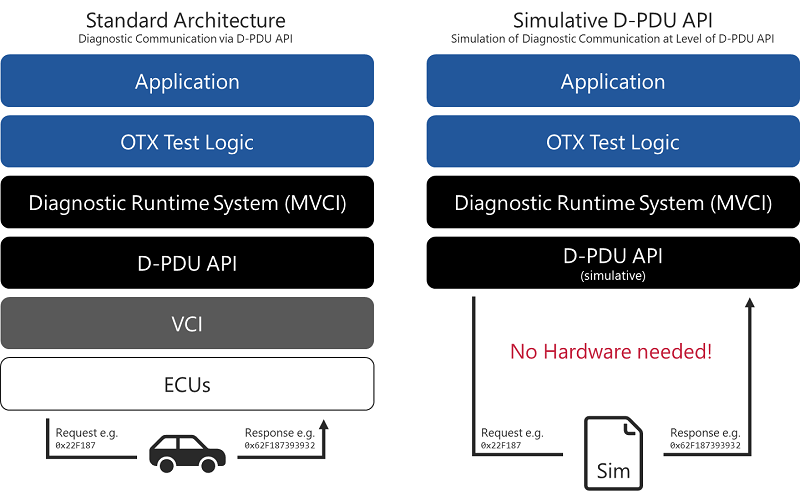
The following figure illustrates the basic principle of the PDU simulation.
Main Functions
The following main functions are supported:
- Supports CAN and DoIP
- Supports physical and functional addressing
- Supports
VariantIdentification and VariantSelection
- Automatic generation of
TesterPresent
BatteryVoltage (KL30) and IgnitionState (KL15) can be set- Processes simulation files from
DiagRA-S and from a DiagLogging file
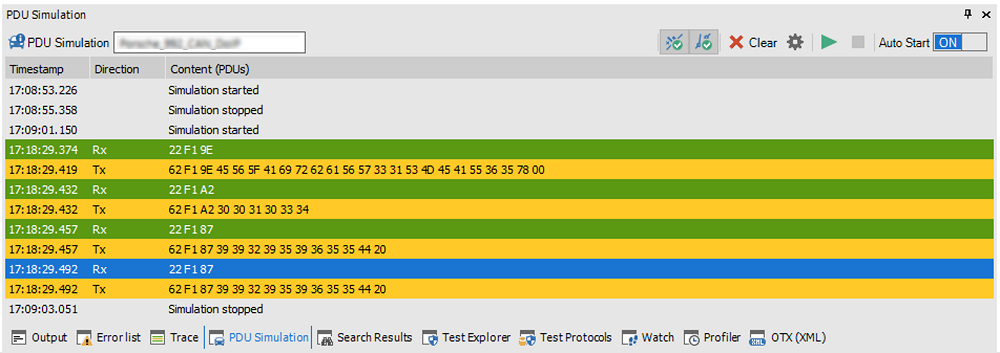
Note: The tool window for the PDU simulation is disabled by default and must therefore be enabled, as shown in the figure:

Step by Step
Procedure to use the PDU simulation:
- Install the PDU Simulation installer
Before the built-in PDU simulation can be used, the provided installer SimulationDPduApiMsi_WinXX_X.X.X.XXXXX.msi must be installed. Please note that architectures cannot be mixed. If the OTF is used in 32-bit or 64-bit mode, the corresponding PDU simulation version must be used as well.
- Select the simulated D-PDU API
After installing the installer, the appropriate D-PDU API should already be selected. Details on the selection can be found in section Selection of the D-PDU API.
- Select the simulation file
The simulation is stored in a text file that can be selected in the solution settings of the diagnostic runtime system. Details on the selection can be found in section Selection of the Simulation File.
- Enable the D-PDU simulation
To use the D-PDU simulation, it must be enabled. Enabling or disabling the simulation causes the diagnostic runtime system to switch between the two D-PDU APIs configured in the global settings.
- Set Terminal 15 and Terminal 30
The D-PDU simulation also simulates the ignition status (Terminal 15) and the battery voltage (Terminal 30). These can be configured using the buttons in the tool window.
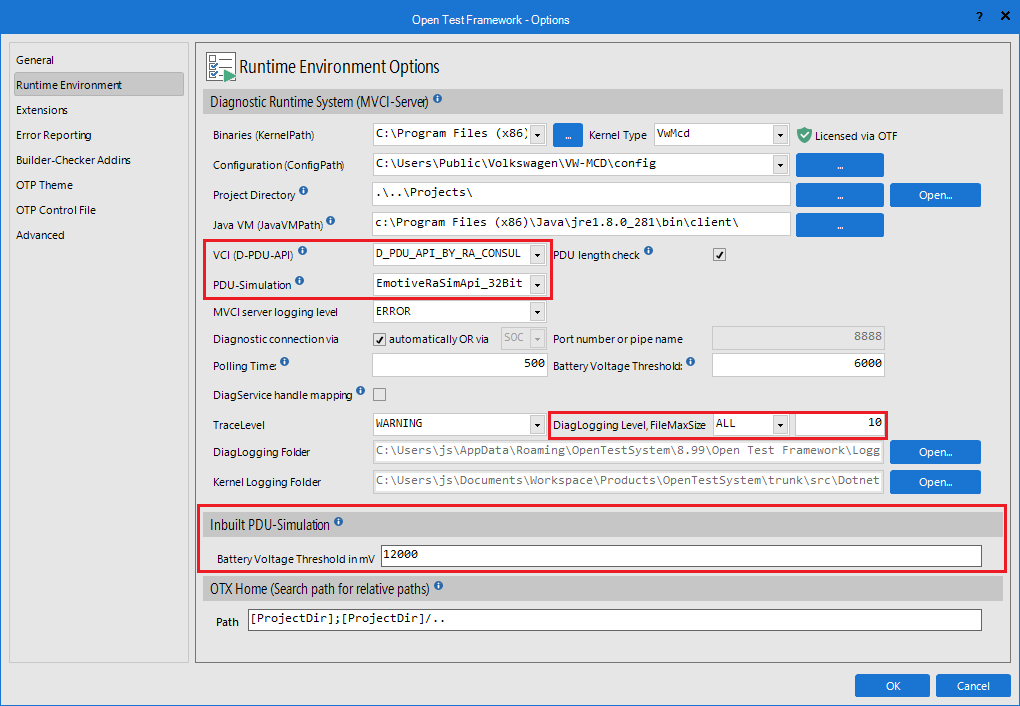
Selection of the D-PDU API
In the global settings of the OTF, two D-PDU APIs can be configured for the diagnostic runtime system (MVCI server): one for normal communication and one for the PDU simulation. Currently, the following D-PDU APIs are configured:
EmotiveRaSimApi_32BitEmotiveRaSimApi_64Bit
Important: Please note that architectures cannot be mixed. If the OTF is used in 32-bit or 64-bit mode, the corresponding D-PDU-API version must be used as well.
Selection of the Simulation File
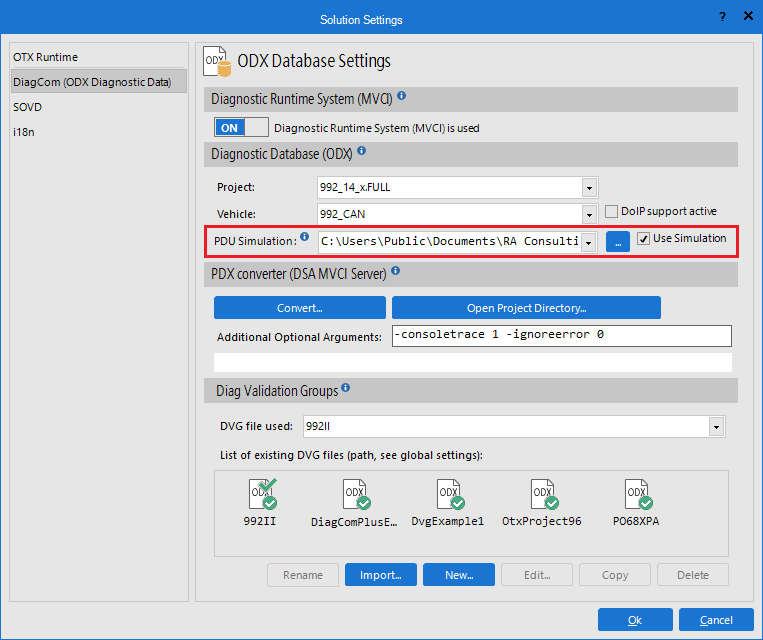
The simulation file can be selected in the solution settings. The following files can be used for the simulation:
Note: DiagRA-S project files can be created and edited using DiagRA-S.
Note: Diag logging files can be generated in the OTF from a real diagnostic communication; see Global Settings → Runtime Environment.
Note: The settings for the simulation file and whether the simulation is enabled are stored together with the solution. These settings are restored when the solution is loaded, allowing the simulation to be used without further configuration.
Simulation File Structure
Simplified structure of a DiagRA-S project file:
<?xml version="1.0" encoding="utf-8"?>
<Project xsi:type="Diagnostics">
<Information />
<DocRevisions />
<Ecu>
<Information>
<Address>17FE0080</Address>
<DoIPLogicalEcuAddress>4080</DoIPLogicalEcuAddress>
<TransportProtocol>CAN</TransportProtocol>
<DiagnosticProtocol>ISO 14229</DiagnosticProtocol>
<ExtendedAddressing>false</ExtendedAddressing>
<Enabled>true</Enabled>
<Delay>0</Delay>
<LogFile />
</Information>
<Module xsi:type="UDS">
<CodFileName />
<RequestIdentifier>17 FC 00 80</RequestIdentifier>
<Service xsi:type="UDS_Service10">
<DiagnosticSession sessionType="03">
<Response n="1" t="1" d="15">00 32 01 F4</Response>
</DiagnosticSession>
</Service>
<Service xsi:type="UDS_Service14" />
<Service xsi:type="UDS_Service19">
<DTC t="85" status="09" hi="00" mi="00" lo="02" severity="00" fgid="00" rgid="00" fu="00" fdc="00" fi="FF">
<Properties isFirstTestFailed="false" isFirstConfirmed="false" isMostRecentTestFailed="false" isMostRecentConfirmed="false" isWithPermanentStatus="false" />
<ExtendedDataRecord number="FF">
<Response n="1" t="95" d="27">01 04 01 02 28 00 00 00 00 FE 50 CA 06 EC 70 00 00 00 00 06 42 89 89 00 00 80 30 00 00 00 80 00 80 00 80 00 80 00 7F 00 10 00 04 00 00 00 00 73 00 00 00 00 FF FF FF FF 00 00 00 00</Response>
</ExtendedDataRecord>
</DTC>
<DTC t="85" status="09" hi="00" mi="00" lo="11" severity="00" fgid="00" rgid="00" fu="00" fdc="00" fi="FF">
<Properties isFirstTestFailed="false" isFirstConfirmed="false" isMostRecentTestFailed="false" isMostRecentConfirmed="false" isWithPermanentStatus="false" />
<ExtendedDataRecord number="FF">
<Response n="1" t="94" d="22">01 04 01 02 28 00 00 00 00 FE 50 CA 06 EC 70 00 00 00 00 06 42 89 89 00 00 80 30 00 00 00 80 00 80 00 80 00 80 00 7F 00 10 00 04 00 00 00 00 73 00 00 00 00 FF FF FF FF 00 00 00 00</Response>
</ExtendedDataRecord>
</DTC>
<DTC t="85" status="09" hi="00" mi="00" lo="21" severity="00" fgid="00" rgid="00" fu="00" fdc="00" fi="FF">
<Properties isFirstTestFailed="false" isFirstConfirmed="false" isMostRecentTestFailed="false" isMostRecentConfirmed="false" isWithPermanentStatus="false" />
<ExtendedDataRecord number="FF">
<Response n="1" t="93" d="29">01 04 01 02 28 00 00 00 00 FE 50 CA 06 EC 70 00 00 00 00 06 42 89 89 00 00 80 30 00 00 00 80 00 80 00 80 00 80 00 7F 00 10 00 04 00 00 00 00 73 00 00 00 00 FF FF FF FF 00 00 00 00</Response>
</ExtendedDataRecord>
</DTC>
</Service>
<Service xsi:type="UDS_Service22">
<Identifier id="F1 9E">
<Response n="1" t="2">45 56 5F 43 68 61 73 73 43 6F 6E 74 72 43 6F 6E 74 69 50 4F 36 38 34 00</Response>
</Identifier>
<Identifier id="F1 A2">
<Response n="1" t="3">30 30 37 30 30 31</Response>
</Identifier>
<Identifier id="06 08">
<Response n="1" t="4">10 6F 2D 5E 3D 5F</Response>
</Identifier>
<Identifier id="63 5E">
<Response n="1" t="5" d="117">39 39 32 39 31 39 38 32 34 47 20</Response>
</Identifier>
<Identifier id="69 5E">
<Response n="1" t="6" d="147">48 30 38</Response>
</Identifier>
<Identifier id="F1 5B">
<Response n="1" t="40" d="1457">00 01 01 00 00 00 00 00 00 00 20 01 31 61 61 61 61 61 61 00 20 01 31 61 61 61 61 61 61 00 20 01 31 61 61 61 61 61 61 00 20 01 31 61 61 61 61 61 61 00 20 01 31 61 61 61 61 61 61 00 20 01 31 61 61 61 61 61 61 00 20 01 31 61 61 61 61 61 61 00 20 01 31 61 61 61 61 61 61 00 20 01 31 61 61 61 61 61 61 00 20 01 31 61 61 61 61 61 61 00 20 01 31 61 61 61 61 61 61 00 20 01 31 61 61 61 61 61 61 00 20 01 31 61 61 61 61 61 61 00 20 01 31 61 61 61 61 61 61 00 20 01 31 61 61 61 61 61 61 00 20 01 31 61 61 61 61 61 61 00 20 01 31 61 61 61 61 61 61 00 20 01 31 61 61 61 61 61 61 00 20 01 31 61 61 61 61 61 61 00 20 01 31 61 61 61 61 61 61 00 20 01 31 61 61 61 61 61 61 00 20 01 31 61 61 61 61 61 61 00 20 01 31 61 61 61 61 61 61 00 20 01 31 61 61 61 61 61 61 00 20 01 31 61 61 61 61 61 61 00 20 01 31 61 61 61 61 61 61 00 20 01 31 61 61 61 61 61 61 00 20 01 31 61 61 61 61 61 61 00 20 01 31 61 61 61 61 61 61 00 20 01 31 61 61 61 61 61 61 00 20 01 31 61 61 61 61 61 61 00 20 01 31 61 61 61 61 61 61 00 20 01 31 61 61 61 61 61 61 00 20 01 31 61 61 61 61 61 61 00 20 01 31 61 61 61 61 61 61 00 20 01 31 61 61 61 61 61 61 00</Response>
</Identifier>
</Service>
<Service xsi:type="UDS_Service3E" />
</Module>
<Errors>
<NoDataBytes />
</Errors>
</Ecu>
</Project>
